One-Time Build vs. Ongoing Care: What a Website Really Costs Over Five Years
Nathaniel Kober · · 13 min read
Part of our Business Growth & Consulting work.
The build price is the number everyone compares, but it's only the first line of what a website costs. Here's an honest five-year comparison of doing the upkeep yourself, walking away, and paying for ongoing care, counting the hours spent on updates, backups and DNS, and why a modest care plan comes out ahead.
Article
When a business owner compares website quotes, they usually compare one number: the price of the build. It's the biggest single check, so it gets the attention. But a website doesn't stop costing money the day it launches. Hosting, the domain, updates, fixes, the occasional emergency and eventually a replacement all land somewhere over the next few years, whether anyone budgets for them or not.
So a better question than "what does the website cost?" is "what does the website cost over five years?" Asked that way, the answer is less obvious than either a cheap freelancer or an agency selling care plans might suggest.
The short answer: count only the invoices, and building a site and walking away looks like the cheapest path. Count everything, including the hours someone has to spend on updates, backups, DNS and renewals to keep the site running, and a modest monthly care plan comes out ahead over five years. The bigger difference is time and frustration. Without a plan, you become the site's manager by default, and every problem lands on your desk. With one, most of that becomes a single email to someone who already has the logins and the backups.
Why five years
Five years is roughly one lifetime for a small business website. Orbit Media, a Chicago web agency, found that its own client sites went an average of six years and four months between major redesigns, while 50 leading marketing brands redesigned about every two years. A local business doesn't need to chase trends, but after five years most sites need at least a refresh: new photos, updated services and a build that meets current standards.
That makes five years a fair window. It's long enough for the ongoing costs to add up, and short enough to picture.
The costs every website has
Some costs show up no matter which path you choose:
- Hosting, the server your site lives on. Cheap shared hosting can cost a few dollars a month at first and renew higher. Faster managed hosting costs more.
- The domain name, typically $10 to $30 a year for a .com.
- Email, if your business email runs through Google Workspace or Microsoft 365.
- Premium plugin and theme licenses. Most commercial WordPress add-ons renew yearly so you keep receiving updates.
- Someone's time to change your hours, add a staff member or post an announcement.
None of these are a reason to choose one path over the other. They're the floor.
The costs that show up without a plan
The bigger differences come from what happens when nobody is looking after the site.
Security problems. WordPress runs a large share of small business websites, and its add-ons are a constant target. Patchstack, a WordPress security firm, counted 11,334 new vulnerabilities in the WordPress ecosystem in 2025, 42% more than the year before, and 91% of them were in plugins. For the most heavily attacked flaws, the typical time from public disclosure to mass exploitation was about five hours. A site whose plugins get updated a few times a year can't keep up with that.
When a site does get hacked, the cleanup is a bill of its own. Security firm Sucuri's malware-removal plans start at about $200 a year, and an emergency fix from a developer is usually billed by the hour. The bigger costs are harder to see: days with a browser warning in front of your site, a contact form that quietly stopped working, and search rankings that take time to recover.
Updates done all at once. Skipped updates don't go away. They pile up, and applying a year's worth in one sitting is far more likely to break something than applying them week by week. That's when a $0 maintenance budget turns into a few hours of a developer's time.
Small changes billed one at a time. New hours, a new service page, a staff photo. Without a plan, each one is a separate request, usually at an hourly rate with a minimum charge.
An early rebuild. This is the big one. A site that gets no attention ages faster. Plugins get abandoned, the theme stops receiving updates and the server software it depends on ages out of security support. Eventually it isn't worth fixing, and the business pays for a new build years earlier than it otherwise would have.
A five-year example
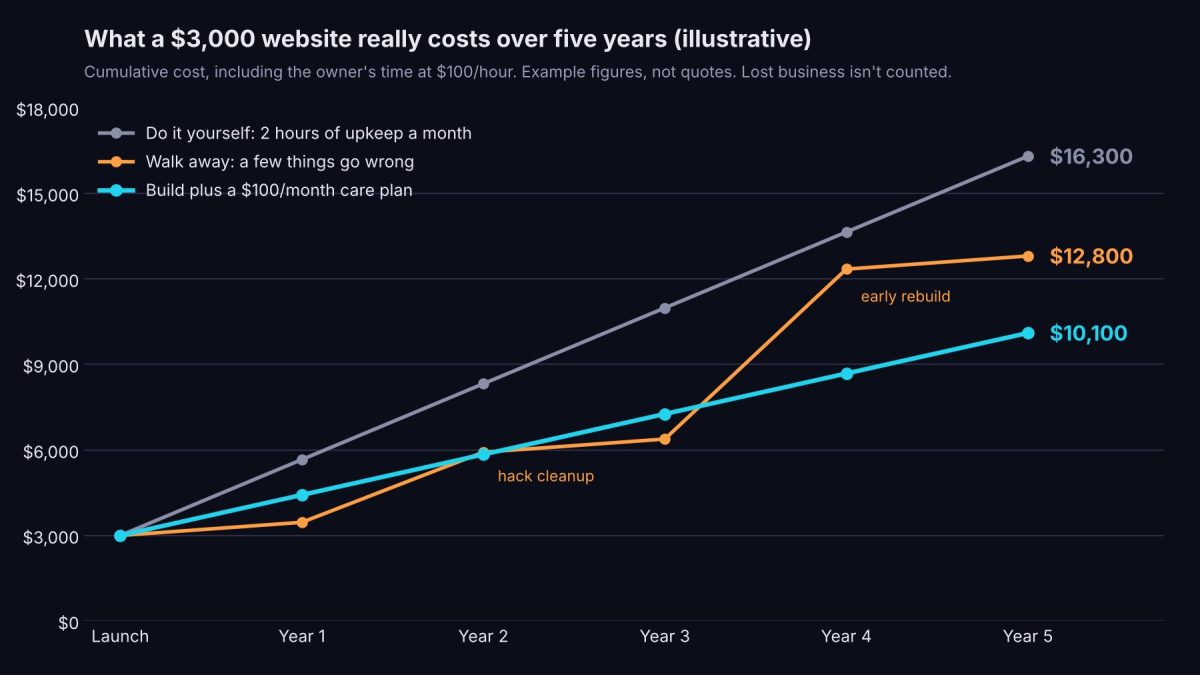
Here's how that plays out for one example: a $3,000 small business website, followed down three paths. These are round, illustrative figures, not quotes from us or anyone else, and your own numbers will differ. What matters is the shape.
- Do it yourself: nothing goes wrong, because you (or someone on your staff) handle the upkeep properly every month.
- Walk away: nobody keeps up with the site, and a couple of ordinary problems follow.
- Care plan: a $100-a-month plan handles the upkeep.
The table counts the owner's time, valued at $100 an hour. An hour an owner spends on the website is an hour not spent selling, serving customers or running the business, and for most owners that hour is worth at least that much. Routine upkeep means applying and checking updates, confirming backups run and can be restored, keeping DNS records and domain renewals in order, testing forms and watching for security problems. Done properly, that's about two hours a month. We've assumed the care plan includes hosting, small edits and cleanup if something does get through. Good plans do, but check yours.
| Cost over five years | Do it yourself: nothing goes wrong | Walk away: a few things go wrong | Build plus a care plan |
|---|---|---|---|
| Website build | $3,000 | $3,000 | $3,000 |
| Hosting | $1,200 ($20/month) | $1,200 ($20/month) | Included in the plan |
| Care plan | None | None | $6,000 ($100/month) |
| Domain name | $100 | $100 | $100 |
| Small changes and fixes | $0 (you do them) | $1,000 (10 hours at $100/hour) | Included in the plan |
| Hack cleanup | $0 | $500 (one incident) | Included in the plan |
| Rebuild | None | $3,000 in year 4 | Not needed yet |
| Your time: routine upkeep (updates, backups, DNS and domain renewals, form and security checks) | $12,000 (2 hours/month) | $0 (skipped, which is why things go wrong) | $0 (handled by the plan) |
| Your time: problems and requests | $0 | $4,000 (40 hours: the hack, the rebuild, chasing fixes) | $1,000 (10 hours of emails and approvals) |
| Five-year total | $16,300 | $12,800 | $10,100 |
What the example shows
- The care plan is the cheapest path once time is counted. At $10,100, it comes in $2,700 under walking away and $6,200 under doing the upkeep yourself.
- Doing it yourself is the most expensive path. On invoices alone it's $4,300. But keeping a site healthy takes about 120 hours over five years, and an owner's hours are the most valuable ones in the business.
- Walking away doesn't save the time, it just moves it. Skip the upkeep and the hours come back later as a hack, a rebuild and a lot of chasing, along with the bills.
- The table still leaves out lost business. It doesn't count the calls you miss while a site is down, flagged or quietly broken. Add those, and the gap widens.
The result holds up even if your time is worth less. In this example, the care plan beats doing it yourself at any value above about $45 an hour, and beats walking away at almost any value at all. Whatever your number is, the honest comparison includes the hours.
Where your hours actually go
Without a plan, someone still has to look after the website. Usually that someone is the owner, whether they meant to sign up for it or not.
Looking after a site properly isn't hard, but it is constant:
- Updates. WordPress, its plugins and the theme all release updates, sometimes several a week. Each one should be applied and the site checked afterward.
- Backups. Someone has to confirm they're running, and occasionally test that one can actually be restored.
- DNS and the domain. Renewals have to be paid before they lapse, and DNS records, including the ones that keep your email out of spam, have to stay correct when anything changes.
- Forms and security. Contact forms fail silently, so someone has to test them. Security warnings have to be noticed and acted on.
- Small changes. Updating holiday hours means finding the login, remembering how the editor works and fixing the layout that shifted when you saved. A five-minute change can eat an evening.
And when something breaks, the hours multiply. You have to notice it, figure out who can fix it, explain the problem, dig up the logins, wait, then check the fix. A hacked site can take days of calls, cleanup and password resets. An early rebuild takes weeks of your input, even when someone else builds it, as we explain in what a website project looks like.
With a care plan, most of that turns into one email: "Please change our hours for the holidays." Someone else already has the logins, knows how the site was built and checks it after every update. The time you get back goes to the work only you can do.
What a broken website actually feels like
The frustration of a broken site rarely comes from the problem itself. It comes from how you find out, how long it takes to fix and who saw it before you did.
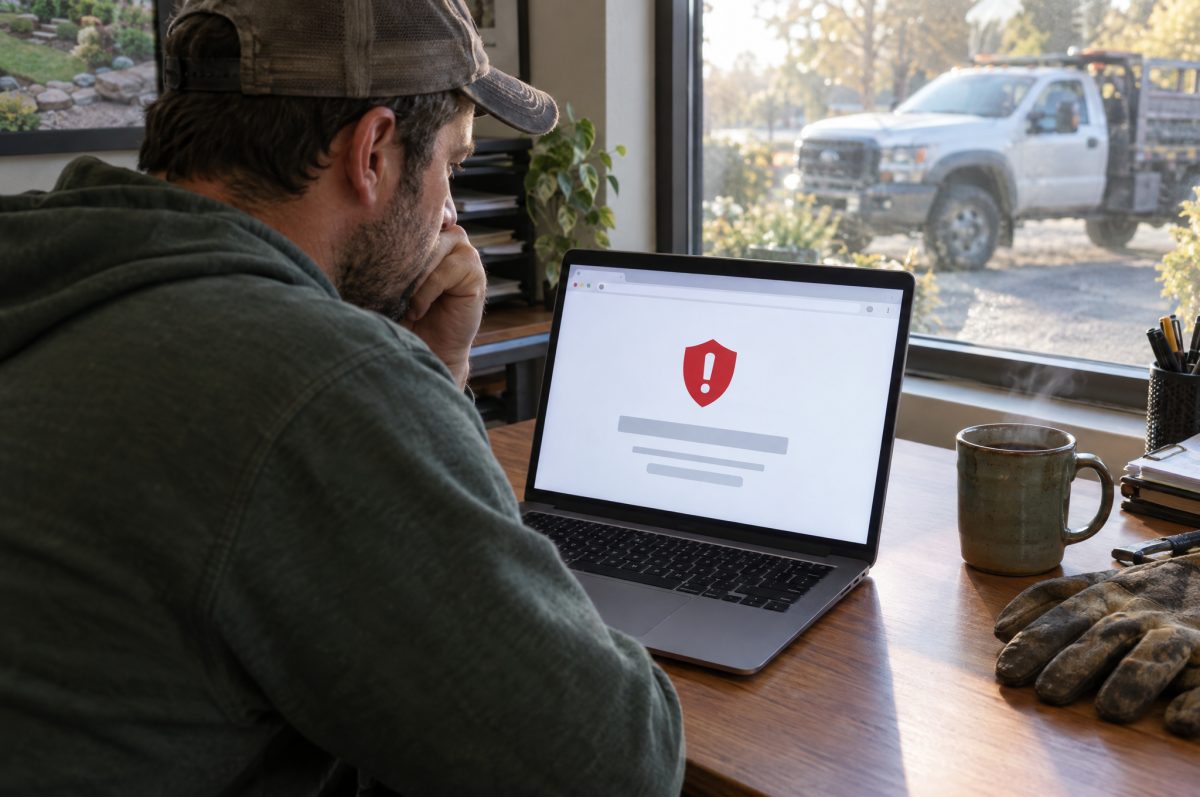
Without anyone watching
- The contact form stops sending, and nobody tells you. There's no error message. The inquiries just stop, and you find out weeks later when a customer asks why nobody called back.
- A customer tells you your site has a warning on it. Browsers and Google flag hacked sites, so the first person to see it is often someone trying to hire you.
- The site goes blank on a Saturday. An automatic update conflicts with a plugin during your busiest weekend, and the developer won't answer until Monday.
- Your emails start landing in spam. A compromised site can send spam from your domain, and your invoices and quotes pay the price.
- Nobody has the logins. The person who built the site has moved on, the domain is in their name and the renewal notice went to an old email address.
- The phone menu won't open. Most visitors are on phones, and they leave for a competitor without telling you why.
With someone watching
- Forms are tested regularly, so a broken one gets caught in days, not weeks.
- Security monitoring flags trouble early, often before a browser warning ever appears, and cleanup is part of the plan.
- Updates are applied and checked, and if one breaks the site, there's a recent backup to roll back to.
- Email records are watched, so a problem that pushes your messages into spam gets noticed and fixed.
- Logins, the domain and renewals are tracked in one place, in your name.
- You have someone to call who already knows how your site was built.
No one can promise a website will never break. What a plan changes is who notices, how fast it gets fixed and how much of it lands on you.
For more on keeping your email out of spam, see SPF, DKIM and DMARC in plain English.
Look only at invoices, and a care plan can seem like an extra expense. Count the hours the upkeep really takes, and the problems that follow when nobody does it, and it's the path that costs less. Like insurance or a good mechanic, it's worth it when the site matters to your business.
When a care plan isn't worth it
A care plan isn't the right answer for every website.
- Someone on your team will actually do the work. If a staff member will apply updates every week, check that backups really restore and knows what to do when something breaks, you may not need to pay anyone else. Be honest about the "actually" part.
- Your site runs on a hosted builder. Squarespace, Wix and Shopify handle software updates and security as part of the subscription. You're already paying for upkeep through that monthly fee, so a WordPress-style care plan would duplicate it.
- The site is temporary. An event page, or a business you're about to sell or close, doesn't need five years of care.
- Nobody would notice if it went down. If your website is truly a digital business card that brings in no calls, the cheapest path may be the right one. Even then, keep the domain and hosting in your own name.
Questions to ask before you budget
Whichever path you choose, ask these before you sign anything:
- What exactly does the plan include? Updates, backups, security monitoring, hack cleanup, and how much time for changes each month.
- What happens outside the plan? Ask for the hourly rate and whether there's a minimum charge.
- Are updates tested before they go live? On a copy of the site, or straight on the real one?
- Who owns the domain, hosting and site files? You should, even if your provider manages them. Our guide to what managed WordPress care actually covers explains what to look for in the agreement.
- What happens if I leave? You should get your domain and a full copy of your site, with nothing standing in the way except any balance you owe.
How we handle it
At Kosmic Edge, we offer both hosting plans and Managed Care plans. Care plans run from $75 to $500 a month, depending on the size of the site and how much changes on it. We're glad to lay out the five-year cost of each option side by side so you can decide with real numbers. And our plans are built so we never hold a site hostage: if you leave, you get your domain and a full copy of your site, as long as there's no unpaid balance.
Frequently asked questions
How much does it cost to maintain a website each year?
Hosting and the domain are the floor, often a few hundred dollars a year for a small site. Professional care plans add a monthly fee that depends on what's included. Kosmic Edge's plans run $75 to $500 a month; other providers vary. If you do the upkeep yourself, count your time too: about two hours a month for a typical small WordPress site.
How much time does website maintenance take?
Done properly, routine upkeep such as updates, backup checks, DNS and domain renewals, and form tests takes an hour or two a month. Problems take much longer: even a simple repair can cost a few hours of an owner's attention, and a hacked site can take days.
Is a website maintenance plan worth it?
Usually, when the site brings in business and nobody in-house will reliably handle updates, backups and problems. Once the owner's time is counted, a modest plan often costs less over five years than doing it yourself. It's less worthwhile for sites on hosted builders like Squarespace or Wix, temporary sites, or sites nobody relies on.
How long should a small business website last?
With regular care, many sites last five years or more before a major redesign. One web agency found its client sites averaged more than six years between redesigns.
What happens if I never update my WordPress site?
Its plugins fall behind on security fixes. Thousands of new WordPress vulnerabilities are found every year, and the most attacked ones are exploited within hours of disclosure, so an unmaintained site becomes steadily easier to break into.
Do Squarespace and Wix sites need maintenance?
The platform handles software updates and security. You still need to keep your content, hours, contact details and settings current.
Related reading
- What managed WordPress care actually covers, and why sites break without it.
- What a website project looks like, from kickoff to launch.
- SPF, DKIM and DMARC in plain English: keeping your email out of spam.
- How to show up in AI answers: a 2026 guide for local businesses.
Sources
- Patchstack, State of WordPress Security in 2026
- Orbit Media, What is the average website lifespan?
- Sucuri, WordPress hack and malware removal plans
The five-year example uses illustrative figures for a hypothetical website, including an assumed value of $100 an hour for the owner's time. They are not price quotes.