
WordPress plugin
KosmicBooking
Class and appointment booking for your own website
KosmicBooking takes bookings for classes, appointments and events, collects payment, sends the reminders and keeps the records, all on the WordPress site you already have.
Built for
- CPR & first-aid training
- Fitness & yoga studios
- Workshops & courses
- Lessons & appointments
- Events with limited seats

At a glance
Everything a class-based business needs, in one plugin
Most booking tools were made for one-to-one appointments. KosmicBooking was made for classes: many people book seats in the same session, each person pays for the seats they take, and nobody gets double-booked. It runs inside WordPress, so your bookings, customers and payments stay on your own site.
Seats, not slots
Several customers book the same class until it is full. The last seat can never be sold twice.
Paid when they book
Cards, Apple Pay and Google Pay through Stripe. The full price, or a deposit with the rest paid online later.
Reminders that send themselves
Branded emails and texts before and after each class, plus birthday greetings and certification renewals.
Customers help themselves
An account where customers see, move, cancel and pay for their own bookings, within your rules.
Your business at a glance
Dashboard, calendar, bookings, customers and reports in one full-screen app inside WordPress.
Fits your website
A booking window on any page, or a Book now button that opens it. Works with the block editor and Elementor.
Moving from Amelia
Bring customers, bookings, payments and instructors across in one import, without emailing anyone.
Your site, your data
Everything lives in your WordPress database. Updates arrive in WP Admin like any other plugin.
For your customers
A booking window that walks people through it
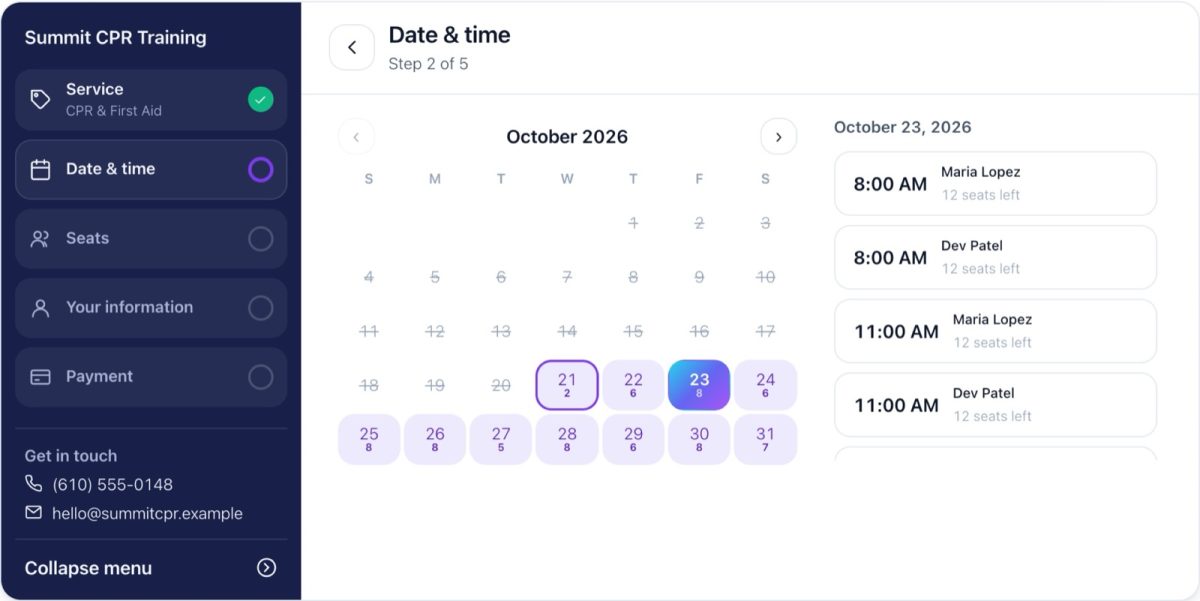
Customers book in five short steps: the class, a date and time, how many seats, their details, and payment. The steps run down the side and tick off as they go, with what was chosen under each, so it is always clear where they are and what they are paying for.

Seats held while they pay
A seat is held for a few minutes during checkout and released if the customer walks away.
A name for every seat
Booking for a group? They give the name of each person attending.
Your own questions
Ask anything per service, such as an employer or a certification number, and see the answers on the booking.
Courses and waitlists
Sell a multi-session course as one booking. When a full class frees up, the next person on the waitlist is offered the seat.
Your hours, your rules
Business hours, instructor hours, holidays, how far ahead people can book, and when they can still cancel or reschedule.
No double-booking
When two people go for the last seat at the same moment, one gets it and the other is told straight away.
On your website
On a page, in a pop-up, on a phone
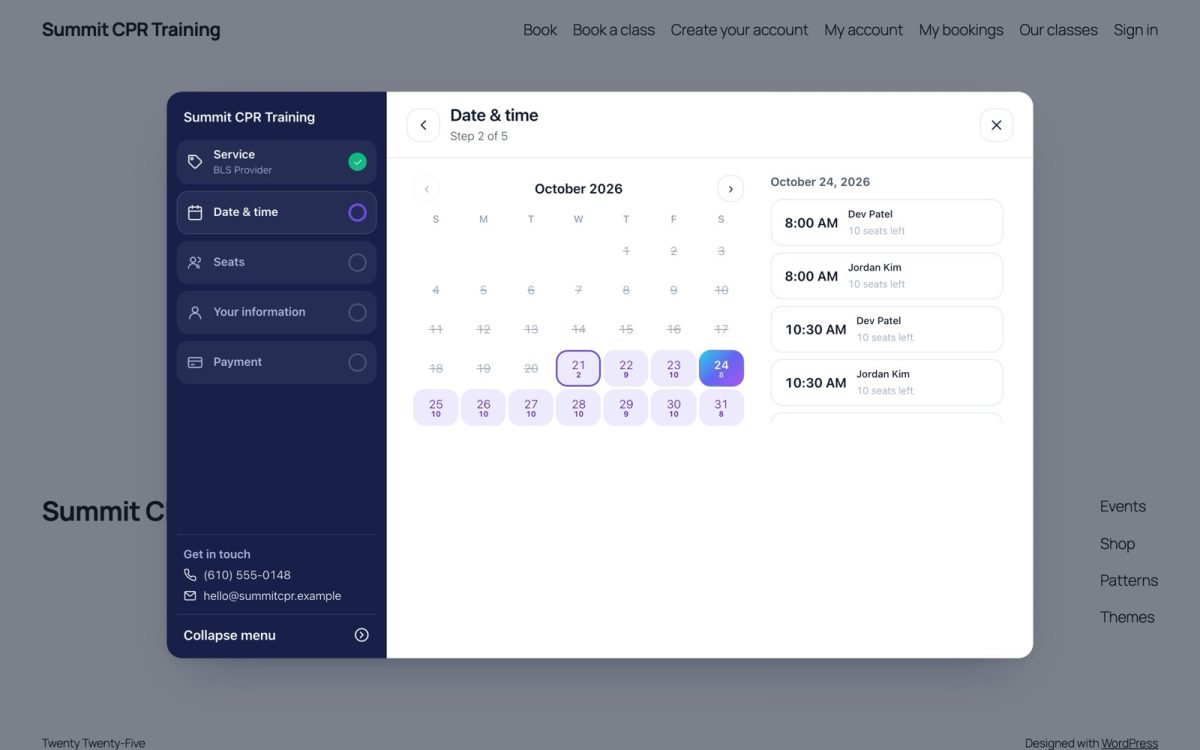
Put the booking window on a page, or add a Book now button anywhere that opens it in a pop-up. Any link on your site can open it too, even straight to one class, so your own buttons and menu items can start a booking.

Looks right on any theme
It takes your brand colours and keeps its own look, even on themes that restyle every button.
Fits a laptop screen
Choosing a date and time fits on a typical laptop screen without scrolling.
Works with your page builder
A block, a shortcode, and Elementor widgets. More on the page-builder page.
Keyboard and screen-reader friendly
Focus moves to each new step, every control is labelled, and the pop-up closes with Escape.
Payments
Getting paid, up front or in parts
Payments go straight to your own Stripe account. Take the full price when people book, or a deposit and the rest later. KosmicBooking keeps track of who has paid what and who still owes.


Cards, Apple Pay and Google Pay
Through Stripe, with a test mode for trying everything before you go live.
Deposits your way
A percentage, or a fixed amount charged per seat or once per booking: $25 a seat makes three seats a $75 deposit.
Balances paid online
Customers pay what is left from their bookings page, and a reminder asks them a few days before the class.
Paid at the desk
Cash, cheques and card-machine payments are recorded on the booking, so the balance is always right.
Refunds from the booking
Refund all or part of a payment in a couple of clicks; the customer gets an email.
Discount codes and packages
Codes with limits and dates, and session packages such as a 5-class pass that customers spend at checkout.
WooCommerce, if you prefer
Bookings can go through your WooCommerce checkout instead.
A guided Stripe setup
A step-by-step guide in the plugin checks your keys and connection.
Keeping customers informed
The reminders send themselves
Confirmations, reminders and follow-ups go out on their own, by email and text message, in your brand and in your words.



Branded emails
Confirmations, reminders, changes, cancellations, refunds, balances due and waitlist offers.
Text messages
Through Signal House or Twilio, sent only to the countries you allow.
Automations
A reminder before each class, a follow-up after, birthday greetings, and a renewal reminder when someone's certification is about to run out.
Your words
Edit any message, preview it with real booking details, and send yourself a test first.
Customer accounts
Customers look after their own bookings
Customers get an account on your site. They can see what is coming up, move or cancel within your rules, and pay what they owe, without calling you.

Upcoming and past bookings
Each with its date, place and confirmation code.
Reschedule or cancel
Up to the cut-off you set.
Pay the balance
By card, from the same page.
Invitations
Invite any customer to make an account. Customers moved from Amelia keep their logins.
Running the business
Your day, your week, your numbers
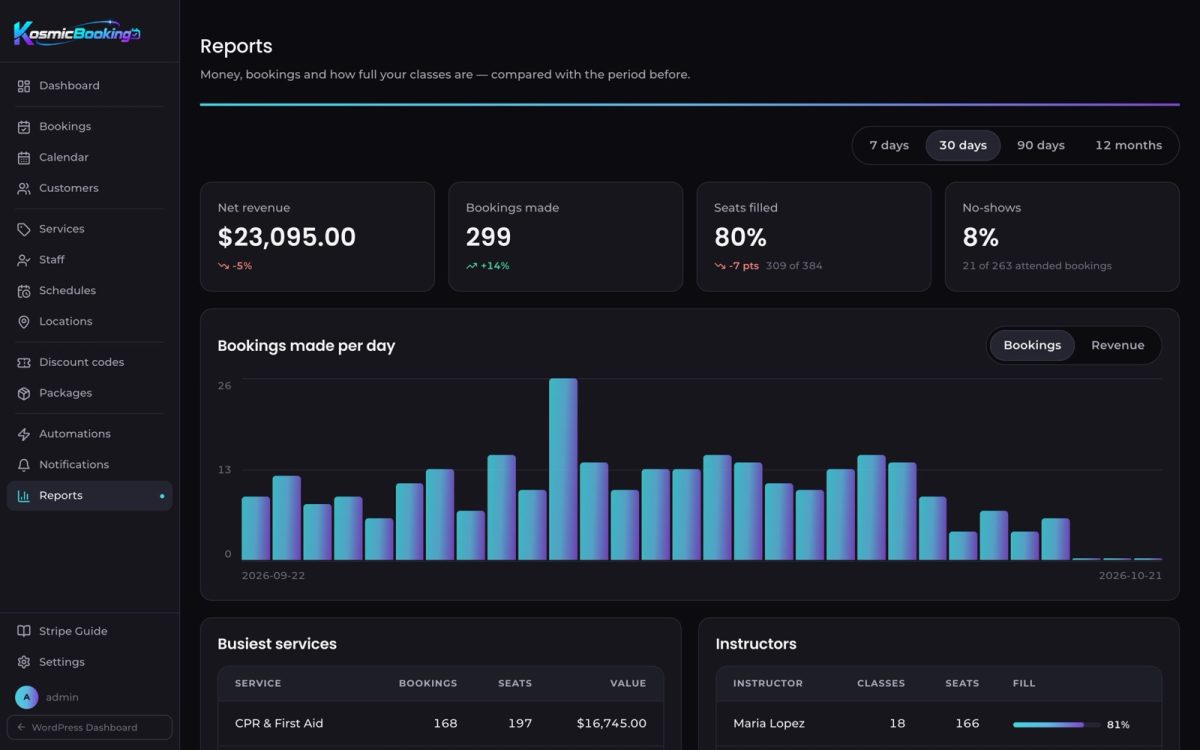
A full-screen app inside WordPress for the people running the classes: what is on today, who is booked, who still owes, and how this month compares with the last.


Customers & reports
Know every customer, and every number


Set up your way
Built around how you already work
Services, staff, schedules and rules are set up once, in plain screens, and everyone on your team sees only what they need.

Classes, appointments and events
Price per seat, seats per class, length, buffers, deposit, location and an intake form for each.
Staff and schedules
Each instructor's hours, days off and the services they teach.
Roles
Managers and instructors get their own logins and see only what they need.
Google Calendar and iCal
Instructors' classes appear in their own calendars.
Locations
Each class says where it happens, in every email.
Labels
Reword any text customers see, without touching code.
Your page builder
Place it with the tools you already use
However your site is built, adding booking is a matter of dropping it where you want it.


Elementor V4 widgets
Booking Form, My Bookings, Customer Account, Create Account and Sign In, each taking Elementor's styles.
Block editor and shortcode
A KosmicBooking block, or [kosmicbooking] anywhere shortcodes work.
Book now buttons
Show the form on the page, as a button that opens a pop-up, or only from your own links.
Your colours
Set your brand colours once and the booking window, emails and sign-in page all use them.
Switching over
Moving from Amelia without starting over
Install KosmicBooking on the same site and bring everything across in one import. It shows you what will come over before anything moves, and nobody is emailed.

What comes across
- Customers, with their logins and notes
- Every booking, past and upcoming, with what was paid and what is still owed
- Payment history
- Instructors with their hours and days off
- Services, events, discount codes, packages and deposit settings
How the switch goes
- Seats already sold stay taken, so no class is oversold
- Run it again on the day you switch to pick up anything booked since
- Move your users from Amelia's roles to KosmicBooking's, with undo
- Then switch Amelia off
Your site, your data
Peace of mind
Your data stays with you
Bookings, customers and payments live in your own WordPress database, not someone else's platform.
Kept if you reinstall
Deleting the plugin keeps your data unless you choose to erase it.
Card details never touch your site
Stripe handles them; your site only learns that a payment succeeded.
Updates in WP Admin
New versions arrive like any other plugin, with notes on what changed.
Every customer-facing word
Can be reworded with Labels, so the booking speaks your language.
People behind it
You work directly with the team that builds KosmicBooking, not a call centre.
Requirements
What you need
WordPress 6.4 or later
With PHP 8.1 or later. Running it from Constellation needs WordPress 6.9.
HTTPS and Stripe
A secure site and a Stripe account for live card payments. Test mode works without either going live.
Optional extras
Signal House or Twilio for texts, Elementor for page building, WooCommerce for its checkout.
Setup
Getting started
-
Install and add your brand
Your business name, logo, colours and contact details.
-
Connect Stripe
The built-in guide walks you through test keys, then live ones.
-
Add services and staff
Your classes, instructors and their hours.
-
Put booking on your site
A page, a pop-up button, or your page builder.
-
Turn on reminders
Pick the automations you want, and optionally connect text messages.
-
Take bookings
And watch them arrive on the dashboard.
Let's get your classes booking
KosmicBooking is made and supported by Kosmic Edge Marketing in Easton, Pennsylvania. Talk to the people who build it about setting it up on your site, or moving over from the system you use today.
Screens shown use demonstration data. Features described are those of KosmicBooking as of October 2026.